Salespeople
Applies to: SuperAdmin only. Last reviewed: 2026-11-18.
A salesperson is a referral partner who introduces driving schools to DriveFlow. Each salesperson has a referral code. When a school enters that code before its first payment, the school's subscription payments earn the salesperson commission for an agreed number of months.
Note
A salesperson is a record only. It has no sign-in account and belongs to no school.
Menu: Sales Management > Salespeople (/sales/salespeople)
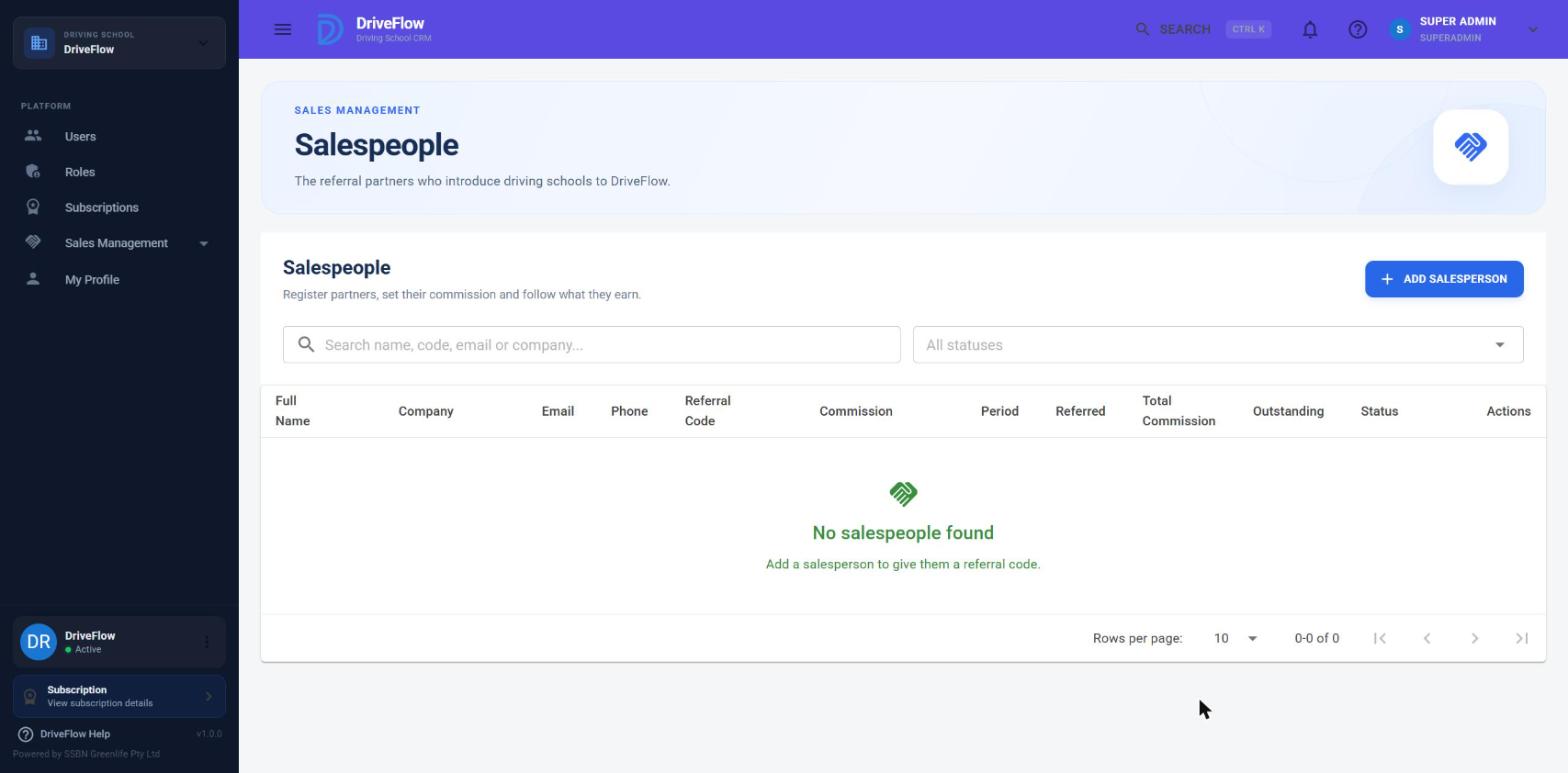
The Salespeople list
Columns
| Column | Meaning |
|---|---|
| Full Name | The salesperson's name |
| Company | The company they work for, or - |
| Contact email | |
| Phone | Contact phone, or - |
| Referral Code | The code schools enter |
| Commission | The percentage that applies to schools that have not paid yet |
| Period | The number of months that applies to schools that have not paid yet |
| Referred | Number of schools that have this salesperson's code applied |
| Total Commission | Commission generated so far (reversed commissions and clawback lines left out) |
| Outstanding | Commission that is Pending or Approved, not yet paid out |
| Status | Active, Inactive or Suspended |
| Actions | A three-dot menu, see below |
Click a row to open the salesperson's detail page.
Searching and filtering
- Search box ("Search name, code, email or company..."): matches the full name, email, referral code, company and phone number.
- Status filter ("All statuses"): Active, Inactive or Suspended.
The Actions menu
| Item | What it does |
|---|---|
| View details | Opens the detail page |
| Edit | Opens the Edit Salesperson dialog |
| Referred customers | Opens Customer Referrals filtered to this salesperson |
| Commission history | Opens Sales Commissions filtered to this salesperson |
| Activate | Shown when the status is not Active |
| Deactivate | Shown when the status is not Inactive |
| Suspend | Shown when the status is not Suspended |
Registering a salesperson
- Open Sales Management > Salespeople.
- Click Add Salesperson. The Add Salesperson dialog opens.
- Fill in the fields (see the table below).
- When you leave the Full name field, DriveFlow fills in a suggested Referral code. You may type your own instead.
- Click Save.
The message "Salesperson added." appears and the list reloads.
Screenshot to be added
Screen: Add Salesperson dialog. Should show: all fields including the "Bank details for payouts" section.
Fields
| Field | Required | Limits | Meaning |
|---|---|---|---|
| Full name | Yes | 150 characters | The salesperson's name |
| Company (optional) | No | 200 characters | The business they represent |
| Yes | 256 characters, must contain @ |
Contact address. Also used for the self-referral check (see below). | |
| Phone | No | 30 characters | Contact number |
| Referral code | No | 3 to 40 characters | The code schools enter. Left empty, DriveFlow generates one. Helper text on a new salesperson: "Generated from the name. You can change it." |
| Status | Yes | Active, Inactive, Suspended | Starts as Active |
| Commission | Yes | 0 to 100 (%) | Percentage of net eligible revenue. Starts at 20. Stored to two decimals. |
| Commission period | Yes | 1 to 12 (months) | How long each referred school earns commission, counted from that school's first payment. Starts at 12. |
| Bank | No | 100 characters | Bank name, for payouts |
| Account holder | No | 150 characters | Name on the account |
| Account number | No | 30 characters | Stored encrypted (see Bank details) |
| Branch code | No | 20 characters | Bank branch code |
The referral code
Format. A code is 3 to 40 characters. It may contain letters, numbers and dashes, and must start with a letter or a number. It is always stored and compared in upper case, so df-thily-001 and DF-THILY-001 are the same code.
Suggested codes. The suggestion has the form DF-NAME-001:
NAMEis the first word of the full name, letters and digits only, at most 10 characters, in upper case. If the name has no usable characters,REFis used.- The number is one more than the count of all salespeople ever created, including deleted ones, shown with at least three digits. If that code already exists, the number goes up until a free code is found.
Example: the third salesperson ever registered is "Thily Naidoo". The suggestion is DF-THILY-003.
The dialog replaces its own suggestion if you change the name before saving. It never replaces a code that you typed yourself.
Uniqueness. A code is unique forever. It cannot be the same as the code of any other salesperson, active or not, and codes of deleted salespeople are never handed out again. The database enforces this with a unique index.
Validation messages
| Message | Cause |
|---|---|
| Enter the salesperson's full name. | Full name is empty |
| Enter a valid email address. | Email is empty or has no @ |
| The commission percentage must be between 0 and 100. | Commission outside 0 to 100 |
| The commission period must be between 1 and 12 months. | Period outside 1 to 12 |
| Choose a valid status. | Status is not one of the three values |
| A referral code is 3 to 40 letters, numbers and dashes, for example DF-THILY-001. | The code has other characters, is too short or too long, or starts with a dash |
| The referral code 'XXX' is already used by another salesperson. | The code exists already (in any letter case) |
Two salespeople may share the same email address. Only the referral code must be unique.
Example
Thily Naidoo of Naidoo Consulting will refer driving schools for 20% commission over 12 months.
| Field | Value |
|---|---|
| Full name | Thily Naidoo |
| Company (optional) | Naidoo Consulting |
| thily@example.co.za | |
| Phone | 082 555 0101 |
| Referral code | DF-THILY-001 (suggested) |
| Status | Active |
| Commission | 20 |
| Commission period | 12 |
| Bank | First National Bank |
| Account holder | T Naidoo |
| Account number | 62000000000 |
| Branch code | 250655 |
After saving, give Thily the code DF-THILY-001 to pass on to the schools she speaks to.
Editing a salesperson
- On the Salespeople list open the three-dot menu and click Edit, or open the detail page and click Edit.
- Change the fields.
- Click Save. The message "Salesperson saved." appears.
What a change affects:
| Changed field | Effect on existing records |
|---|---|
| Commission, Commission period | Applies only to schools that have not paid yet. Schools that already paid keep the percentage and period that were fixed at their first payment. The dialog says: "A new percentage or period applies to schools that have not paid yet. Schools that already pay keep the terms they were referred on." |
| Referral code | The new code must be used from now on. Referrals that already exist keep showing the code as it was applied. |
| Status | See the next section |
| Name, company, email, phone | Shown everywhere from now on, including on old commissions |
| Bank details | Replaces what was stored |
Important
A school that has a code applied but has not paid yet shows the percentage and period the salesperson had when the code was applied. The agreed terms are set again, from the salesperson's current values, at the moment the first payment is received.
Statuses: Active, Inactive, Suspended
| Status | New schools can use the code | Existing referrals keep earning | Chip colour |
|---|---|---|---|
| Active | Yes | Yes | Green |
| Inactive | No | Yes | Grey |
| Suspended | No | Yes | Red |
Inactive and Suspended behave the same in the system. The difference is only the label, so that you can tell a partner who stopped from one you stopped.
To change the status from the list:
- Open the three-dot menu on the salesperson's row.
- Click Activate, Deactivate or Suspend.
- Confirm in the box that appears.
The confirmation text when deactivating or suspending is:
New schools can no longer use {name}'s code {code}. Schools already referred keep earning commission until their period ends.
and when activating:
{name}'s code {code} will work for new schools again.
After confirming, a message such as "Thily Naidoo is now suspended." appears.
A school that tries to apply the code of an Inactive or Suspended salesperson sees "The salesperson code is invalid or inactive." The same message is shown for a code that does not exist, so the school cannot tell which it is.
Bank details
The account number is encrypted before it is stored. The other bank fields (bank, account holder, branch code) are not encrypted.
- The account number is shown in full on the detail page and in the edit dialog. Only a SuperAdmin can open these.
- The account number is not included in the Salespeople list, in reports or in exports.
- If the encryption key that protected a number is lost (for example when moving to a new server), the number cannot be read. It shows as
-and must be entered again. No error is shown.
Warning
Saving the edit dialog with the Account number field empty clears the stored number.
The salesperson detail page
Open it by clicking a row in the list. The title is the salesperson's name and the line under it reads "Referral code {code}". Buttons: Salespeople (back to the list) and Edit.
Screenshot to be added
Screen: Salesperson detail page. Should show: summary cards, the three information panels and the Referred customers table.
Summary cards
| Card | Meaning |
|---|---|
| Referred Customers | Schools with this salesperson's code applied |
| Active Customers | Of those, schools whose current subscription status is Active |
| Cancelled Customers | Of those, schools whose current subscription is Cancelled or Expired |
| Expired Agreements | Referrals whose commission period has ended |
| Commission Generated | All commission generated, reversed and clawback lines left out |
| Commission Paid | Commission settled by payouts (a settled clawback counts negative) |
| Outstanding | Pending and Approved commission. This can be negative when a clawback is waiting to be deducted. |
Panels
- Personal information: Full name, Company, Email, Phone, Referral code, Status, Registered (the date the record was created).
- Commission configuration: Commission and Period, with the note "These apply to schools that have not paid yet. Each referred school below keeps the terms that were set when it first paid."
- Bank details: Bank, Account holder, Account number, Branch code.
Referred customers table
| Column | Meaning |
|---|---|
| Driving School | The school's name |
| Subscription Plan | The school's current plan, or - |
| First Payment | Date of the first payment, or - if none yet |
| Commission | The percentage agreed for this school |
| Period | The period agreed for this school |
| Commission Expiry | The date from which payments no longer earn commission |
| Subscription Status | The school's current subscription status |
| Agreement | Awaiting first payment, Earning or Expired |
| Total Commission | Commission generated on this school |
Click a row to open the referral, with every payment that earned commission. The Commission history button opens Sales Commissions filtered to this salesperson. If no school used the code the table reads "No school has used this code yet."
Limitations and notes
- A salesperson cannot be deleted. Set the status to Inactive or Suspended instead.
- The commission period cannot be longer than 12 months. This limit is fixed in the code.
- A salesperson has one percentage and one period. You cannot set different terms per school in advance. To give one school different terms, change the salesperson's terms before that school's first payment and change them back afterwards. Schools that already paid are not affected.
- The email address is not checked for a valid format beyond containing
@, and is not checked for duplicates.
Related articles
- Customer Referrals - how a referral code is applied to a school
- Commission management - what a salesperson earns
- Commission payments - paying a salesperson
- Sales Management overview - the whole process