Training Packages
Applies to: roles with Settings.View (view) and Settings.Manage (add, edit, delete). Last reviewed: 2026-11-18.
A training package is what a driving school sells to a student: a number of lessons, optionally with other items such as vehicle hire for the test, at a price. This page explains the Training Packages page and the add/edit screens field by field.
1. Key facts
- Packages are created by each school. A new school starts with no packages and no package items.
- A package belongs to one licence code, unless it is an Assessment package.
- A package's price is either typed in directly or built up from package items.
- When a student is given a package it becomes their course, and the number of lessons in the package becomes their lesson allowance (Package allocation).
Packages that exist in the system's own seed data
The only packages created by the system are for its two built-in demonstration schools. They are not copied to real schools.
Seeded packages of the demonstration schools
| Demonstration school | Seeded packages (code - name - lessons - price) |
|---|---|
| DriveFlow Driving School (South Africa) | LL-A - Learner's Licence - Code A - 0 - R 500; LL-B - Learner's Licence - Code B - 0 - R 800; LL-B-5 - Learner's Licence + 5 Lessons - 5 - R 1 800; LL-B-10 - Learner's Licence + 10 Lessons - 10 - R 3 000; LL-B-15 - Learner's Licence + 15 Lessons - 15 - R 4 000; B5 - Code B - 5 Driving Lessons - 5 - R 1 200; B10 - Code B - 10 Driving Lessons - 10 - R 2 500; B20 - Code B Premium - 20 - R 4 500; LL-EB - Learner's Licence - Code EB - 0 - R 900; LL-C1 - Learner's Licence - Code C1 - 0 - R 1 000; C1-10 - Code C1 Standard - 10 - R 5 500; C1-20 - Code C1 Premium - 20 - R 8 500; LL-EC - Learner's Licence - Code EC - 0 - R 1 200; EC-15 - Code EC Professional - 15 - R 12 000 |
| DriveFlow Zimbabwe Driving School | ZW-C2-10 - Class 2 Beginner - 10 - 350; ZW-C4-15 - Class 4 Professional - 15 - 900 |
There are no predefined "Beginner / Standard / Advanced" packages for schools. See Illustrative examples.
2. What a package holds
| Property | Meaning |
|---|---|
| Code | A short internal code, unique within the school. Generated automatically; not shown or editable on screen. |
| Name | The package name shown everywhere (registration, invoices, profile). |
| Description | A description of the package. |
| Package type | Training or Assessment. |
| Licence code | The licence code the package is for. Empty for Assessment packages. |
| Price | What the student is invoiced. Equal to the total of the package items when the package has items. |
| Number of lessons | How many lessons the student may book on this package. |
| Lesson duration (minutes) | Optional. The intended length of one lesson. |
| Validity (days) | Optional. How long the package is meant to be valid. |
| Learner's licence package | A flag marking the package as including the learner's licence. |
| Active | Whether the package is active. |
| Items | The priced lines that make up the package (name, quantity, unit price, "lesson price" flag). |
3. The Training Packages page
Who: users with Settings.View.
Where: left menu > ADMINISTRATION > Settings > Driving School > on the Training Packages card click Manage Packages (/settings/driving-school/packages).
The page is headed Training Packages - "Configure lessons, package items and pricing."
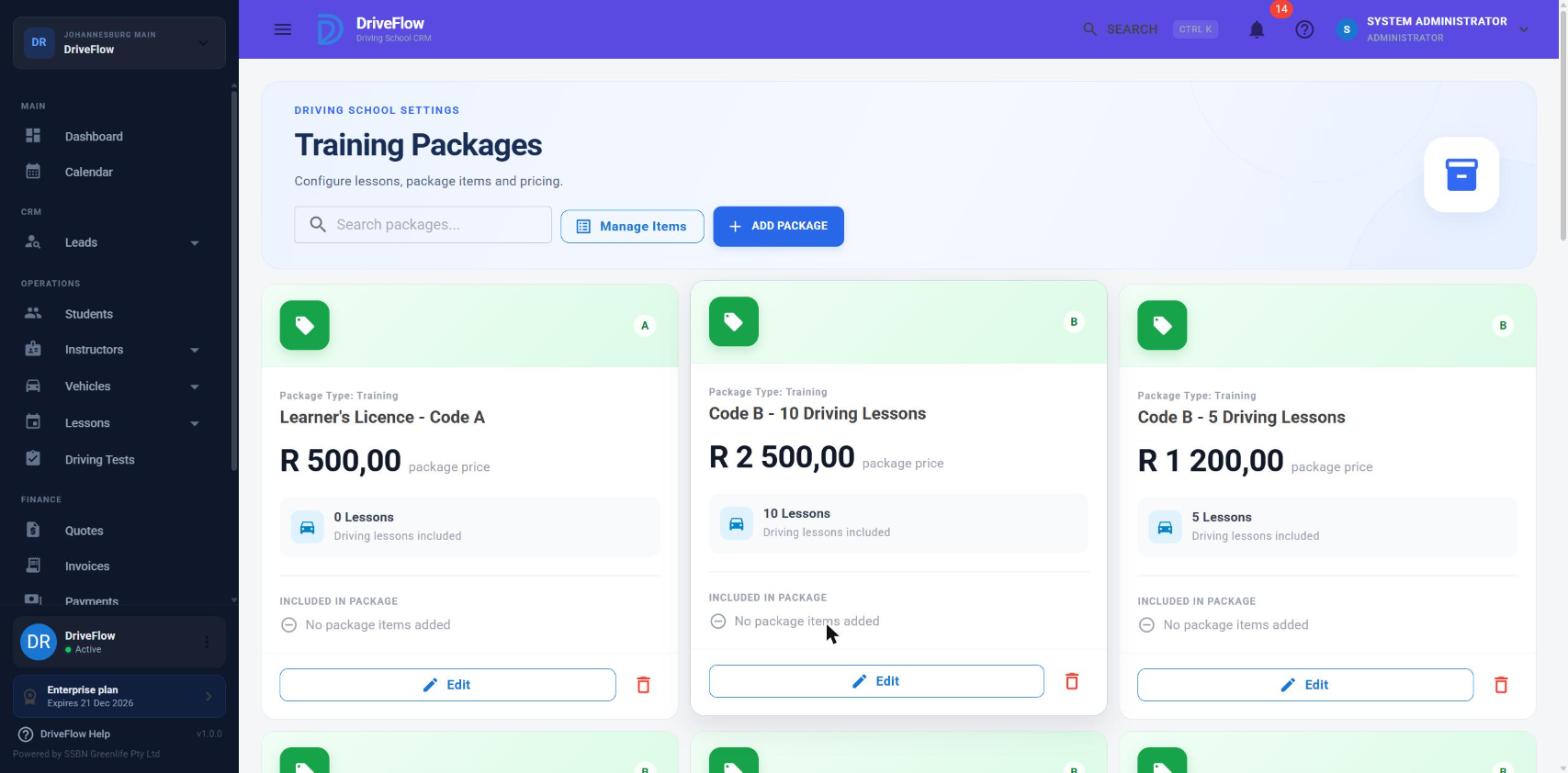
Header controls
| Control | Who sees it | What it does |
|---|---|---|
| Search packages... | Everyone | Filters the cards as you type. Matches the package name, description, licence code, package type (Training / Assessment) and the name of any item in the package. |
| Manage Items | Settings.Manage | Opens the package item catalogue. See Package pricing. |
| Add Package | Settings.Manage | Opens Add Training Package. |
Package cards
Each package is a card showing:
- the licence code chip (empty for Assessment packages);
- "Package Type: Training" or "Package Type: Assessment";
- the package name;
- the price ("R 2,500.00 package price");
- "N Lessons - Driving lessons included";
- INCLUDED IN PACKAGE - each item with its quantity and total (for example "10 × Driving lesson R 2,500.00"), or "No package items added";
- Edit and a red delete (bin) icon.
Cards are ordered by licence code, then name.
Cards do not show Active or Inactive
Active and inactive packages are both shown and look the same: the card does not show whether a package is active. Open Edit to see the Active switch.
Empty states: "No training packages yet - Create your first package to start offering structured driving lessons." with a Create Package button; and when a search finds nothing, "No packages match "(text)" - Try another name, licence code or item." with Clear search.
4. Package types
| Type | Licence code | Minimum lessons | Typical use |
|---|---|---|---|
| Training | Required | 1 (0 if Learner's Licence Package is on) | Normal driving lessons, or learner's licence with or without lessons. |
| Assessment | None - the licence code field is hidden | 0 | A driving assessment that is not tied to a licence code. |
Assessment packages appear in the Training Package list on the registration page for every licence code and even before a licence code is chosen, and a student can be registered on one without a licence code.
5. Adding a package
Who: users with Settings.Manage.
- On the Training Packages page click Add Package. The Add Training Package box opens.
-
Complete the fields:
Field Required What it means Rules and defaults Package Name Yes The name staff and students will see. Up to 200 characters. Message if empty: "Package name is required." Description Yes A short description. Up to 1000 characters. Three lines. Package Type Yes Training or Assessment. Starts on Training. Message: "Please select a package type." Licence Code Yes for Training The licence code the package is for. Only codes your school offers are listed, as "code - name". Hidden for Assessment. Starts on the first code in the list. Message: "Please select a licence code." Price Yes The package price in rand. 0 or more. Becomes read-only once the package has items: it then shows the items' total, with the hint "Total of the package items below". With no items the hint is "Add package items below to build up the price". Number of Lessons Yes The number of lessons in the package. Starts on 1. Minimum 1; minimum 0 when Learner's Licence Package is on or the type is Assessment. Lesson Duration No Length of a lesson in minutes. Starts on 120. Minimum 1. Package Validity No Validity in days. Starts on 90. Minimum 1. Package Items No What the package includes. See Package pricing. "What the package includes. The package price is the total of these items." Learner's Licence Package (switch) No Marks the package as including the learner's licence. Hidden for Assessment. When on, the lesson count may be 0, with the hint "0 = learner's only. Enter the driving lessons included for a learner's + lessons package." Switching it off puts the lesson count back to at least 1. Active (switch) No Whether the package is active. Starts on. -
Click Create Package.
- You see "Package created successfully." and the new card appears.
Screenshot to be added
Screen: Add Training Package box. Should show: all fields, with two package items added and the "Package price" total line.
The package code
You do not type a code. The system generates one from the licence code: the licence code without spaces, in capitals, a hyphen, then a running number - for example B-3, EB-1 or CLASS2-2. Assessment packages use ASSESS-1, ASSESS-2 and so on. The code is used on invoice lines created by Start New Course ("B-3 - Code B 10 Lessons").
Messages when saving
| Message | Cause |
|---|---|
| Package name is required. | Name empty. |
| Package price cannot be negative. | Price below 0. |
| Number of lessons cannot be negative. | Lessons below 0. |
| A licence code is required for this package. | Training package without a licence code. |
| The selected licence code is not available for this driving school. | The licence code has been switched off or does not belong to your school. |
| A package with code '(code)' already exists. | The generated code is already in use (can happen after packages were deleted). See Limitations. |
| Item prices cannot be negative. | An item's unit price is below 0. |
| Item quantities must be at least 1. | An item's quantity is below 1. |
| Only one item can be the lesson price. | More than one item is marked as the lesson price. |
| Each item can only be added to a package once. | The same catalogue item appears twice. |
| One of the selected items is no longer available. | An item was deleted or switched off in the catalogue after you opened the box. |
| Unable to save package. | Refused without a specific reason. |
6. Editing a package
Who: users with Settings.Manage.
- Click Edit on the package's card. The Edit Training Package box opens with the same fields.
- Change what you need.
- Click Save Changes. You see "Package updated successfully."
All fields can be changed, including the type, licence code, price, lesson count and items. The internal code stays as it is.
What a change does to students already on the package
A package is shared, not copied. Students and courses point at the package itself. This has consequences:
| You change | Effect on students already on the package |
|---|---|
| Number of Lessons | Changes their allowance immediately. Every active course on this package now counts the new number. Reducing it can leave students with lessons "booked beyond the package"; increasing it gives them more lessons without billing. |
| Price / items | No effect on invoices already raised. New invoices (new registrations, new courses) use the new price. The "lesson price" suggested for extra lessons changes at once. |
| Name | The new name shows on the profile, courses and lists. Existing invoice lines keep the old text. |
| Licence Code | The package moves to the other licence code's list. Existing courses keep the licence code they were created with. |
| Active | See section 7. |
Changing the lesson count affects existing students
Because of the first row, do not edit the lesson count of a package that students are already using in order to offer a "new version". Create a new package instead and switch the old one off.
7. Deleting and deactivating a package
Who: users with Settings.Manage.
Delete
- Click the red bin icon on the card.
- Confirm in the delete box.
What happens depends on whether the package has ever been used:
| Situation | Result | Message |
|---|---|---|
| No student and no course has ever used the package | The package is permanently removed. | Package deleted. |
| The package is in use and is active | It is switched off (made inactive) instead of deleted, so history stays intact. | This package is in use by students or courses, so it was deactivated instead of deleted. |
| The package is in use and already inactive | Nothing changes. | This package is in use by students or courses and cannot be deleted. |
"In use" means any student record or any course - current or past - points at the package.
Deactivate
Open Edit, switch Active off, and Save Changes.
What "inactive" actually does
At present, very little. An inactive package:
- still appears on the Training Packages page (with no visible marker);
- still appears in the Training Package list on Register Student, Start New Course, invoices and quotes, and can still be chosen;
- keeps working for students already on it.
The Active flag is stored and returned to those screens, but none of them filters on it.
Stopping a package being sold
If you need to stop a package being sold, tell staff, and consider renaming it (for example adding "(old)" to the name).
8. Example
A school wants a 10-lesson Code B package at R 2 800 that includes vehicle hire for the test.
- Manage Items > add "Driving lesson" at R 250 and "Vehicle hire for test" at R 300. Done.
- Add Package: Package Name "Code B - 10 Lessons + Test Vehicle"; Description; Package Type Training; Licence Code B - Code B.
- Number of Lessons 10; Lesson Duration 60 minutes; Package Validity 120 days.
- Under Package Items: add "Driving lesson", set Qty 10 (R 2 500.00); add "Vehicle hire for test", Qty 1 (R 300.00). The Price field now reads R 2 800.00 and is read-only.
- Leave Learner's Licence Package off and Active on. Click Create Package.
The package appears with the code B-<n> and can be chosen when registering a Code B student.
9. Illustrative examples
Examples only
These are examples only. They are not predefined DriveFlow packages, and DriveFlow does not create them for you. They show how a school might set up a typical range using the real fields. Prices and item names are invented; use your own.
Assumed catalogue items (set up once under Manage Items): "Driving lesson (60 min)" R 280, "Driving lesson (90 min)" R 400, "Vehicle hire for test" R 450, "Test booking assistance" R 150, "Learner's licence class" R 350.
| Example package | Type | Licence code | Lessons | Duration | Validity | Items (qty × unit price) | Price | Learner's Licence Package |
|---|---|---|---|---|---|---|---|---|
| Beginner - a complete novice, including the learner's licence | Training | B | 20 | 60 | 180 | 1 × Learner's licence class R 350; 20 × Driving lesson (60 min) R 280; 1 × Vehicle hire for test R 450; 1 × Test booking assistance R 150 | R 6 550 | On |
| Standard - has a learner's licence, little experience | Training | B | 15 | 60 | 120 | 15 × Driving lesson (60 min) R 280; 1 × Vehicle hire for test R 450 | R 4 650 | Off |
| Advanced - can drive, needs polish for the test | Training | B | 8 | 60 | 90 | 8 × Driving lesson (60 min) R 280; 1 × Vehicle hire for test R 450 | R 2 690 | Off |
| Refresher - a licensed driver wanting confidence | Training | B | 3 | 90 | 60 | 3 × Driving lesson (90 min) R 400 | R 1 200 | Off |
| Intensive - many lessons in a short period | Training | B | 10 | 90 | 30 | 10 × Driving lesson (90 min) R 400; 1 × Vehicle hire for test R 450 | R 4 450 | Off |
Notes on these examples, based on what the system really does:
- "Beginner", "Standard" and so on are just package names. DriveFlow has no package "level" or "category" field.
- On the Beginner example, mark the driving-lesson item as the Lesson price (Enterprise plan) so that one lesson is valued at R 280 rather than R 6 550 ÷ 20. See Package pricing.
- The Refresher example is for someone who already has a licence. DriveFlow still applies the learner's licence rule when booking lessons, so tick Has Learners Licence on such a student (with no expiry date, or a future one), otherwise their lessons cannot be booked.
- The Intensive example's 30-day validity and 90-minute duration are recorded only. DriveFlow does not stop bookings after the validity period, and the lesson length used on the calendar is set when the lesson is scheduled. See Limitations.
- A driving assessment before choosing a package could be a sixth package of type Assessment with 0 or 1 lessons and no licence code.
10. Limitations and notes
- Validity is not enforced. "Package Validity" is shown on the registration page ("Valid for N days") but nothing expires: lessons can be booked after the period and no reminder is sent.
- Lesson duration is not enforced here. It is stored on the package; how long a booked lesson is depends on the scheduling screens (see Scheduling lessons). This page's authors did not find a rule that forces a booked lesson to match the package's duration.
- Inactive packages can still be sold (section 7).
- Cards do not show Active / Inactive.
- Edit and delete buttons are shown to users without Settings.Manage. A user with only Settings.View sees Edit and the bin icon on each card (and Create Package on the empty page); the server refuses the save or delete.
- Editing the lesson count changes existing students' allowances (section 6). There is no package versioning.
- The package code cannot be seen or edited on screen, and automatic codes can collide. The next code is "number of existing packages whose code starts with the licence code, plus one". Deleting a package, or having codes that share a prefix (B and codes starting with B, such as packages for a code like "B1" if one existed), can produce a code that already exists, giving "A package with code '...' already exists." Saving again does not help; the workaround is to create and delete a throw-away package to move the count on, or ask a developer.
- "Learner's Licence Package" is mostly informational. It allows a package with 0 lessons. It does not book a learner's test or change the lesson-booking rules by itself; those depend on the student's learner's licence and booked learner's test.
- Description is compulsory on screen but not on the server.
- Packages are per school, not per branch. Every branch sees and sells the same packages at the same price.
- Prices are shown with "R" on these screens regardless of the school's country.
- The management endpoints are in a controller, not in application handlers (
DrivingSchoolController.cs), so there are no validators beyond the checks listed above.
Related articles
- Package pricing - package items, the lesson price and invoices.
- Licence codes - the codes packages belong to.
- Courses - what a package becomes once a student takes it.
- Package allocation - how the number of lessons becomes the allowance.
- Student enrolment - the ways a student is put on a package.