Gateway Fee Settings
Applies to: SuperAdmin only. Last reviewed: 2026-11-18.
A payment gateway keeps a fee on every transaction. A salesperson's commission is worked out on what is left after that fee. Gateway Fee Settings holds the fee rate of each gateway, from a date, so DriveFlow can estimate the fee on a payment when the gateway does not report it.
Menu: Sales Management > Gateway Fee Settings (/sales/gateway-fees)
When a rate is used, and when it is not
| Payment | Which fee is used |
|---|---|
| The gateway reported its fee with the payment | The reported fee (type Actual). The rate here is not used for the calculation. It is still stored on the commission as a record. |
| The gateway reported no fee | The rate that applied on the payment's date (type Estimated) |
| A manual payment recorded by the SuperAdmin | No fee. Manual payments have no gateway, and you cannot add a rate for them. |
| The gateway reported no fee and no rate matches | R 0.00. The empty-list text says: "No gateway fees are set. Until one is, a payment whose gateway reports no fee is treated as fee-free." |
The estimated fee is: amount charged x fee percentage / 100 + fixed fee. See Commission management for the full formula.
The rate that DriveFlow starts with
A new installation has one rate:
| Payment Gateway | Fee Percentage | Fixed Fee | Currency | Effective From | Effective To |
|---|---|---|---|---|---|
| PayFast | 3.00% | R 0.00 | ZAR | 01 Jan 2026 | Open-ended |
PayFast is the only gateway that takes DriveFlow subscription payments today.
The list
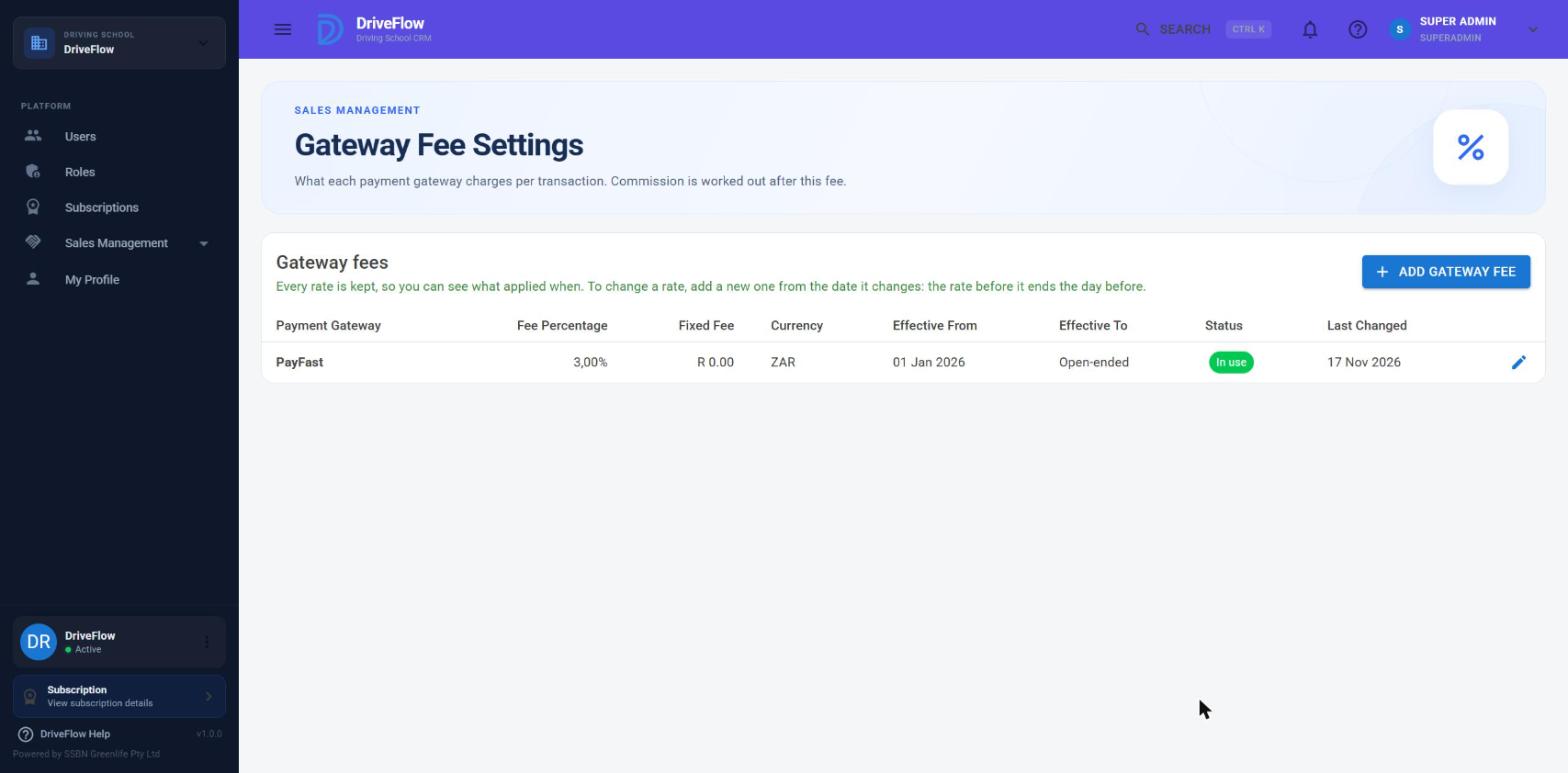
| Column | Meaning |
|---|---|
| Payment Gateway | PayFast, Paystack, Flutterwave or Stripe |
| Fee Percentage | Percentage of the amount charged |
| Fixed Fee | Fixed amount per transaction |
| Currency | Three-letter currency code |
| Effective From | First day the rate applies |
| Effective To | Last day the rate applies, or "Open-ended" |
| Status | See below |
| Last Changed | Date the rate was last saved |
| (pencil icon) | Edit |
Rates are listed by gateway, then currency, with the newest start date first.
Status chips
| Chip | Meaning |
|---|---|
| In use | Active, and today falls inside its dates |
| Upcoming | Active, but its start date is in the future |
| Ended | Active, but its end date has passed |
| Inactive | The Active switch is off. The rate is never used. |
Adding a rate
- Open Sales Management > Gateway Fee Settings.
- Click Add Gateway Fee.
- Fill in the fields.
- Click Save. The message "Gateway fee saved." appears.
| Field | Required | Rules | Meaning |
|---|---|---|---|
| Payment gateway | Yes | PayFast, Paystack, Flutterwave or Stripe. Manual is not offered. | The gateway the rate is for |
| Currency | Yes | Exactly three letters, stored in upper case, for example ZAR | The currency of the payments it applies to |
| Fee percentage | Yes | 0 to 100, stored to two decimals | Percentage the gateway keeps |
| Fixed fee per transaction | Yes | 0 or more, stored to two decimals | Fixed amount the gateway keeps per payment |
| Effective from | Yes | A date. Starts as today. | First day the rate applies |
| Effective to (optional) | No | Not before the start date | Last day the rate applies. Empty means open-ended. |
| Active | - | Switch | Off means the rate is ignored |
The note in the dialog reads: "This rate is used to estimate the fee on a payment when the gateway does not report the fee it charged. Commissions that were already generated keep the fee they were calculated with."
Changing a rate from a date
Tip
Do not edit the old rate. Add a new one.
- Click Add Gateway Fee.
- Choose the same gateway and currency.
- Enter the new percentage and fixed fee.
- Set Effective from to the day the new rate starts. Leave Effective to empty.
- Click Save.
DriveFlow ends the earlier open-ended rate for you: its Effective to becomes the day before the new rate starts. Both rates stay in the list, so you can always see what applied when. The page says: "Every rate is kept, so you can see what applied when. To change a rate, add a new one from the date it changes: the rate before it ends the day before."
Example: PayFast is 3.00% from 1 January 2026, open-ended. PayFast raises its fee to 3.5% plus R 2.00 from 1 March 2027. Add a PayFast ZAR rate of 3.5% and R 2.00 with Effective from 01 Mar 2027. The old rate now shows Effective to 28 Feb 2027. A payment on 27 February 2027 is estimated at 3%, and a payment on 1 March 2027 at 3.5% plus R 2.00.
Important
This automatic ending only happens when the new rate is open-ended and starts after the earlier open-ended rate. In every other case you must set the dates yourself so that they do not overlap.
Overlaps
Two active rates for the same gateway and currency may not cover the same day. If they would, saving is refused with a message such as:
PayFast already has an active ZAR rate from 01 Jan 2026 onwards. End that rate first, or choose dates that don't overlap it.
To fix it, edit the existing rate and give it an Effective to date before your new rate starts, or switch its Active switch off, then save the new rate.
Inactive rates are not checked for overlaps.
If more than one rate does match a payment (which the overlap check should prevent), the one with the latest start date is used.
Editing a rate
Click the pencil icon, change the fields and click Save. All the rules above apply. Editing does not end other rates automatically.
Editing is meant for correcting a mistake or ending a rate. It changes the rate for payments received from now on that fall inside its dates.
History is never recalculated
Each commission stores the fee percentage, the fixed fee and the fee amount it was calculated with. Changing, ending or deactivating a rate has no effect on commissions that already exist. This is confirmed by the system's tests: after a rate was changed from 5% to 6%, an existing commission still showed 5% and the same fee and commission amounts.
Warning
If a rate was wrong for a period, the commissions created in that period stay as they were. There is no "recalculate" function.
Validation messages
| Message | Cause |
|---|---|
| Choose a payment gateway. | No gateway, or Manual |
| The fee percentage must be between 0 and 100. | Percentage out of range |
| The fixed fee can't be negative. | Negative fixed fee |
| Enter a three-letter currency code, for example ZAR. | The currency is not exactly three letters |
| Choose the date the rate starts. | No start date |
| The end date can't be before the start date. | End before start |
| {Gateway} already has an active {currency} rate from {date} {to date / onwards}. End that rate first, or choose dates that don't overlap it. | Overlap with another active rate |
| Gateway fee setting not found. | The rate being edited no longer exists |
Summary of the setting
| Question | Answer |
|---|---|
| Who can change it | SuperAdmin |
| Default | PayFast 3.00%, R 0.00 fixed, ZAR, from 1 January 2026 |
| Takes effect | Immediately, for payments received inside the rate's dates |
| Affects existing commissions | No |
| Restart needed | No |
Limitations and notes
- A rate cannot be deleted. Switch Active off to stop it being used.
- Paystack, Flutterwave and Stripe can be chosen, but DriveFlow subscription payments only go through PayFast today, so rates for the other gateways have no effect at present.
- The rate is one percentage and one fixed fee. Tiered fees, minimum fees and different fees per card type cannot be set. Where the gateway reports its actual fee, this does not matter.
- The rate matches a payment by the payment's date in UTC.
Related articles
- Commission management - the full commission formula
- Sales Management overview - the Sales Management pages
- Payment gateways - the gateways DriveFlow supports
- Platform settings - what the SuperAdmin can change