Lesson history
Applies to: Owner, Administrator, Manager, Receptionist, Instructor, Finance, Viewer, Student. Last reviewed: 2026-11-18.
Lessons are never deleted. Past, cancelled and missed lessons stay in the system and can be looked up in several places. This page shows where.
Where to find past lessons
| Place | Best for | Permission |
|---|---|---|
| Lessons > Lessons | Finding any lesson by student, instructor, vehicle, number, date or status | Lessons.View |
| Student profile, Lessons tab | One student's lessons and package progress | Students.View and Lessons.View |
| Student Calendar, Instructor Calendar, Vehicle Calendar | A week or day at a glance for one person or vehicle | as for the page they are opened from |
| Calendar | The whole school, by day, week or month | Calendar.View |
| Reports > Lesson Report | Totals by instructor, licence code and day; exports | Reports.View and Lessons.View |
| Reports > Sign-Off Report | Signatures for completed lessons | Reports.View and Lessons.View |
| Student portal, My lessons / My calendar / My requests | The student's own view | Student account |
By default every staff role holds Lessons.View, including Finance and Viewer.
The Lessons page
Menu Lessons > Lessons.
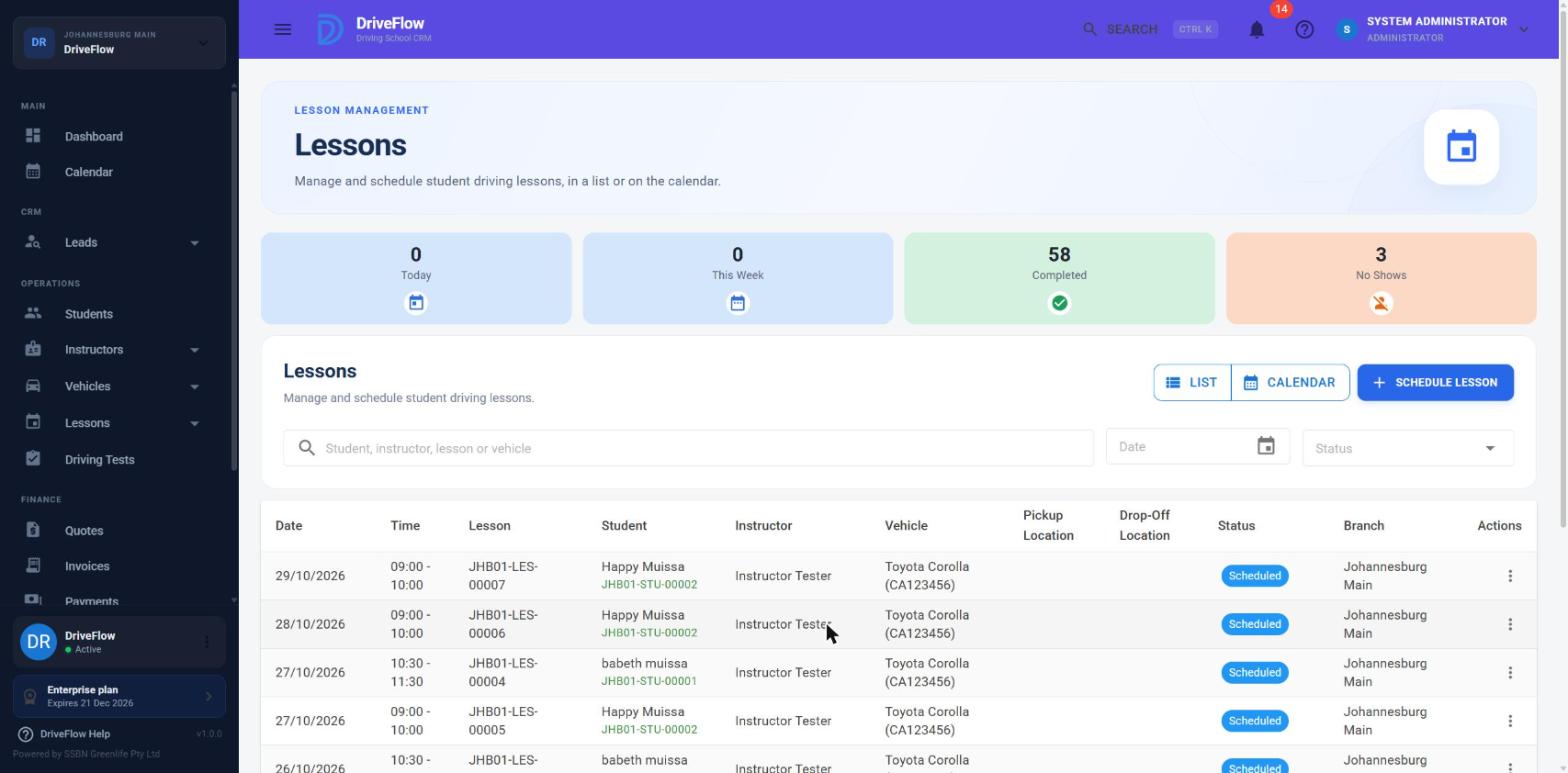
Summary cards
| Card | Counts |
|---|---|
| Today | Lessons starting today |
| This Week | Lessons starting this week, Monday to Sunday |
| Completed | All lessons with status Completed |
| No Shows | All lessons with status No Show |
The cards count across all lessons you are allowed to see, not just the page on screen. Today and This Week include cancelled lessons.
Filters
| Filter | Behaviour |
|---|---|
| Search box ("Student, instructor, lesson or vehicle") | Matches the lesson number, the student's first or last name, the instructor's first or last name, or the vehicle registration. |
| Date | Shows lessons starting on that day. |
| Status | All, Scheduled, Completed, Cancelled or No Show. |
Opening the page from the header search or from a notification fills in the search box with the lesson number.
Table columns
Date, Time, Lesson (number), Student (name and student number), Instructor, Vehicle, Pickup Location, Drop-Off Location, Status, Branch, Actions.
The table is sorted newest first and can be re-sorted by Date, Lesson, Student, Instructor, Status or Branch. It is paged on the server.
Pickup and Drop-Off columns are empty
The list does not load these two values, so the columns are blank for every row. Open Lesson Details or the Edit dialog to see them.
Lesson details
Open the row menu and click View. The Lesson Details dialog shows:
| Section | Content |
|---|---|
| Header | Lesson number and status |
| Schedule | Date, Start Time, End Time |
| Student | Name and student number |
| Instructor | Name |
| Vehicle | Make, model and registration |
| Location | Branch, Pickup Location, Drop-off Location |
| Notes | Shown when there are any |
The Notes are the nearest thing to a history of the lesson. Over its life the system adds lines to them:
| Line added | When |
|---|---|
| Whatever was typed in Notes when booking | Booking |
| The student's note, then "School: {note}" | A student's request is approved |
| "Moved from Tue 24 Nov 2026 10:00 at the student's request." | A student's change request is approved |
| The instructor's lesson notes | Instructor sign-off |
| "Cancelled: {reason}" | Cancelled with a reason |
| "Cancelled: Cancelled by the student: {reason}" | Cancelled by the student |
| "Cancelled: Learner's test failed" | Cancelled after a failed learner's test |
A student's lesson history
Open Students, choose the student, and go to the Lessons tab.
Screenshot to be added
Screen: Student profile, Lessons tab. Should show: the four summary cards, the Extra lessons panel and the lessons table.
Student summary cards
| Card | Meaning |
|---|---|
| Purchased (or Purchased (incl. 2 extra)) | Lessons in the package plus extra lessons |
| Completed | Lessons with status Completed |
| Remaining | Purchased minus Completed |
| Next Lesson | The earliest Scheduled or Confirmed lesson |
Which lessons are listed
The tab shows the lessons of the student's current course: the active course, or the most recent completed course if none is active. Lessons not linked to any course are also listed (for example an extra lesson booked after the course was completed).
Note
Lessons from older courses are not shown here; find them on the Lessons page by searching for the student.
Columns: Lesson, Date, Time, Instructor, Vehicle, Status, Actions. Newest first.
Other things on this tab
- Schedule Lesson - see Scheduling lessons.
- Add Extra Lesson and the Extra lessons panel (Added, Charge, Invoice, Reason, Added by) - see the package and finance guides.
- Complete Training - see the student guide.
- A notice when training is completed: "Training is completed. Add an extra lesson, or start a new course, to schedule more lessons." or "Training is completed. 1 extra lesson(s) still to be scheduled."
- A warning when more lessons are booked than the package and extra lessons cover, with the row action Bill as extra lesson.
The row menu is the same as on the Lessons page; see Lesson attendance.
Instructors' own history
An instructor who only manages their own lessons sees only their own lessons on every page above. The Lessons page shows "You're seeing your own lessons."
Student reviews
After a lesson is completed, the student can rate it.
Student side
In the portal, Rate your lessons lists completed lessons that have not been rated.
- The student clicks Rate this lesson to open the form.
- They tap 1 to 5 stars (Poor, Fair, Good, Very good, Excellent).
- Optionally they add a Comment (optional).
- They click Send rating. Message: "Thanks for your rating."
The page explains: "Tell your driving school how your lessons went. Your instructor won't see your name, only the school's owner can. A rating can't be changed once sent."
| Rule | Message |
|---|---|
| 1 to 5 stars | "Please choose a rating from 1 to 5 stars." |
| Lesson must be Completed | "You can rate a lesson once it has been completed." |
| Only within 90 days after the lesson | "Lessons can be rated for up to 90 days afterwards." |
| One rating per lesson | "You've already rated this lesson." |
| Comment of at most 1000 characters | "Please keep your comment to 1000 characters." |
Staff side
Menu Instructors > Reviews opens Instructor reviews - "How students rate their lessons. Students rate each completed lesson from their portal; reviews can't be edited." It needs Instructors.View. The table shows Reviewed, Instructor, Student, Lesson, Rating and Comment, and can be narrowed to one instructor. Reviews cannot be edited or deleted by staff. See also Instructor performance.
Reports
- Lesson Report (
/reports/lessons) - "Lesson activity, instructor performance and training hours." Tables by instructor (Lessons, Completed, Scheduled, Cancelled, Hours, Completion), by licence code, by day, and a detail list (Lesson, Date, Student, Instructor, Vehicle, Licence, Duration, Status). Can be exported. - Sign-Off Report (
/reports/sign-offs) - "Lesson sign-offs with instructor and student signatures." A summary by instructor (Sign-Offs, Instructor Signed, Student Signed, Fully Signed) and a detail list showing both signature images.
Both need a date range. See the reports guide for full details.
Limitations and notes
- Pickup Location and Drop-Off Location columns are empty in the Lessons table. The list does not load these two values, so the columns are blank for every row. The values are shown correctly in Lesson Details and in the Edit dialog.
- No change log on a lesson. The system does not record who booked, moved or cancelled a lesson or when, apart from the note lines listed above. Previous times of a moved lesson are not kept unless the move came from a student's change request.
- No lesson type is shown anywhere.
- Status filter is incomplete. You cannot filter by Confirmed, In Progress or Awaiting Student Sign-off. Use the Calendar or sort by Status.
- The student's Lessons tab shows the current course only.
- Signatures are not shown in Lesson Details; use the Sign-Off Report.
- Lessons are never deleted from the web application. There is no delete action.
- The review window in days and the comment length limit are fixed in the system and are not settings a school can change.
Related articles
- Lesson attendance - lesson statuses and the row menu.
- Lesson sign-off - signatures and completion.
- Lesson calendar - the calendars for one person or vehicle.
- Lesson reports - the Lesson Report.
- Sign-off report - signatures for completed lessons.
- Instructor performance - reviews from the staff side.