Test history
Applies to: Owner, Administrator, Manager, Receptionist, Instructor, Finance, Viewer. Last reviewed: 2026-11-18.
Tests are never deleted. Booked, completed and cancelled tests all stay on record. This page shows where to look them up.
Where to find tests
| Place | Best for | Permission |
|---|---|---|
| Driving Tests page | Every test in the school; search and filters | DrivingTests.View |
| Student profile, Driving Tests tab | One student's tests | Students.View and DrivingTests.View |
| Calendar | Tests in the diary alongside lessons | Calendar.View |
| Vehicle Calendar | Tests using one vehicle | Vehicle access |
| Reports > Driving Test Report | Totals and pass rates; exports | Reports.View and DrivingTests.View |
| Student portal and mobile app | The student's own upcoming test | Student account |
By default every staff role holds DrivingTests.View.
The Driving Tests page
Menu Driving Tests (/driving-tests). The page is headed Driving Tests - "Book learner's and driving licence tests, and track their results."
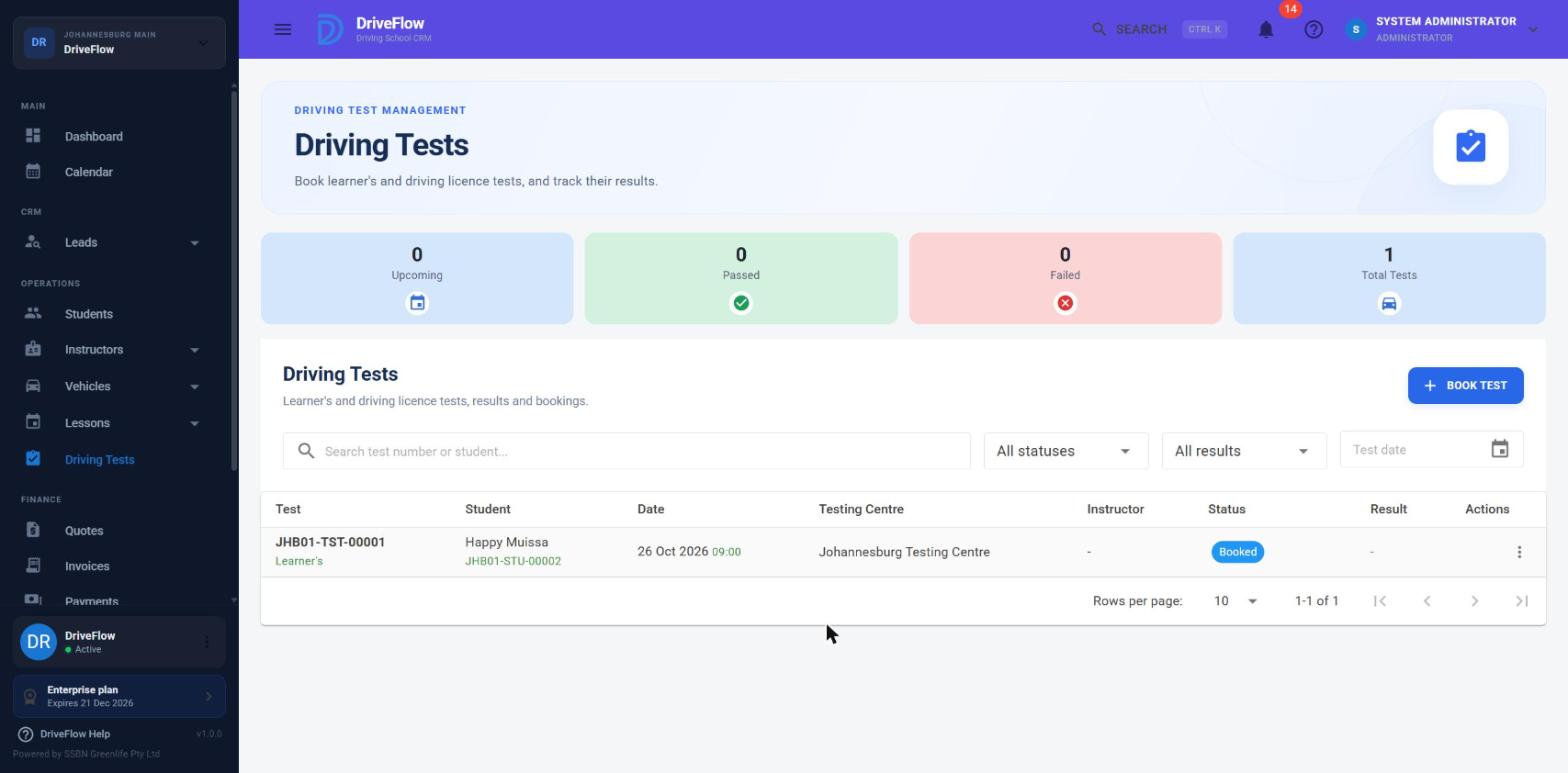
Screenshot to be added
Screen: Driving Tests page. Should show: summary cards, filters and the table with Status and Result chips.
Summary cards
| Card | Counts |
|---|---|
| Upcoming | Tests with status Booked, dated today or later |
| Passed | Tests with result Passed |
| Failed | Tests with result Failed |
| Total Tests | All tests, including cancelled ones |
Search and filters
| Filter | Behaviour |
|---|---|
| Search box ("Search test number or student...") | Matches the test number, the testing centre name, the student's first name, last name or student number, or the instructor's first or last name. |
| Status | All statuses, Booked, Completed or Cancelled. |
| Result | All results, Passed or Failed. |
| Test date | Tests on that date. |
Opening the page from the header search or a notification fills in the search box with the test number.
Table columns
| Column | Content |
|---|---|
| Test | Test number, with Learner's or Driving licence underneath |
| Student | Name and student number |
| Date | Test date, with the time underneath |
| Testing Centre | Centre name |
| Instructor | Instructor name, or a dash for a learner's test |
| Status | Booked (blue), Completed (green), Cancelled (grey) |
| Result | Passed (green outline) or Failed (red outline); a dash until a result is recorded |
| Actions | Row menu |
The table can be sorted by Test, Student and Status. By default it is ordered by test date. If nothing matches: "No driving tests found - Try changing your filters or book a test."
Row menu
| Item | Shown when |
|---|---|
| View | Always (needs DrivingTests.View) |
| Edit | Test is Booked (needs DrivingTests.Edit) |
| Record Result | Test is Booked (needs DrivingTests.Edit) |
| Cancel | Test is Booked (needs DrivingTests.Delete) |
Driving Test Details
Click View in the row menu, or click a test on the calendar. The Driving Test Details dialog shows:
| Section | Content |
|---|---|
| Header | Test number and status |
| Test Information | Test Type, Examiner, Booking Reference, Branch |
| Test Schedule | Date, Time, Testing Centre |
| Student | Name and student number |
| Practical Test Details | Instructor and Vehicle (driving licence tests only) |
| Test Result | Shown once a result is recorded |
| Notes | Shown when there are any |
The Notes build up over the life of the test:
| Line | When |
|---|---|
| The notes typed at booking | Booking, or changed in Edit |
| The Result Comments | Recording the result |
| "Cancelled: {reason}" | Cancelled with a reason (not available from the web application) |
A student's tests
Open Students, choose the student, and go to the Driving Tests tab. It lists all of the student's tests, newest first, with the same row menu as the main page, and a button to book a test for that student (needs DrivingTests.Create).
A student's sequence of tests shows their progress, for example:
| Test | Type | Date | Status | Result |
|---|---|---|---|---|
| DT-0012 | Learner's | 03 Aug | Completed | Failed |
| DT-0019 | Learner's | 24 Aug | Completed | Passed |
| DT-0044 | Driving licence | 14 Dec | Booked | - |
(The test numbers above are only an illustration of the layout.)
For students
Students see their upcoming test on the portal overview and in the mobile app. They cannot book, change or cancel a test themselves. They receive a reminder before the test; see Notifications.
Driving Test Report
Reports > Driving Test Report (/reports/driving-tests) summarises tests for a date range, optionally for one branch: totals, tests by licence code, by instructor, by testing centre and by day, and a detail list. It needs Reports.View and DrivingTests.View, on a plan that includes Reports. See the reports guide.
How the pass rate is worked out
Pass rate = Passed ÷ (Passed + Failed) × 100, so tests without a result are not in the divisor.
Limitations and notes
- Pass and fail figures on the Driving Test Report count by result. Recording a result stores status Completed with a separate Passed or Failed result, and the report's Passed, Failed and Pass Rate figures (overall, and per licence code, instructor, testing centre and day) count tests by that result, so they match the Passed and Failed cards on the Driving Tests page. The pass rate is Passed ÷ (Passed + Failed) × 100, so tests without a result are not in the divisor.
- No audit trail on a test. Who booked, changed, moved or cancelled a test, and when, is not recorded on the test. Earlier dates of a moved test are not kept.
- No filter by test type, branch, instructor or testing centre on the Driving Tests page, although searching by centre or instructor name works.
- Tests are not limited to an instructor's own on the Driving Tests page. An instructor with
DrivingTests.Viewsees every test in the list; only the Calendar restricts them to their own. - The Vehicle column is not in the table; open the details to see the vehicle.
- No document storage on a test (for example a copy of the booking confirmation or the result slip) from this screen.
Related articles
- Booking a test - recording a new test.
- Scheduling a test - changing, moving and cancelling tests.
- Test results - recording a pass or fail.
- Testing centres - the centres tests are linked to.
- Operational reports - the Driving Test Report.